An honest comparison
Quote and Sign vs Qwilr
Qwilr charges per user and per document and gives you a polished, closed product with native CRM connectors. Quote and Sign is one flat price for the account, for agencies, freelancers and service teams. Your client picks the options and signs on any device.
In short: Qwilr is priced per user (Starter $35 a month billed yearly); Quote and Sign is one price per account. For three people a year: Qwilr $3,300 on Growth, which starts at 5 users, Quote and Sign $708. Qwilr is stronger at: native connectors for HubSpot, Salesforce and other CRMs, with two-way sync.
Free plan · No credit card · No account until you send
Updated October 23, 2026. Qwilr prices and features from qwilr.com, read October 2026. If something changed, tell us through the contact form and we will fix it.
What a year of Qwilr costs
| Team | Quote and Sign | Qwilr Starter | Qwilr Growth |
|---|---|---|---|
| Just you | $228 | $420 | $3,300 |
| 3 people | $708 | Not for teams | $3,300 |
| 5 people | $708 | Not for teams | $3,300 |
| 10 people | $708 | Not for teams | $6,600 |
A year in USD, billed yearly. Qwilr: Starter $35 per user a month, one user; Growth $55 per user a month, at least 5 users, from qwilr.com, October 2026. Quote and Sign: Pro for one person, Business for a team of up to 10. Taxes, add-ons and per-document overage not included.
What your client sees
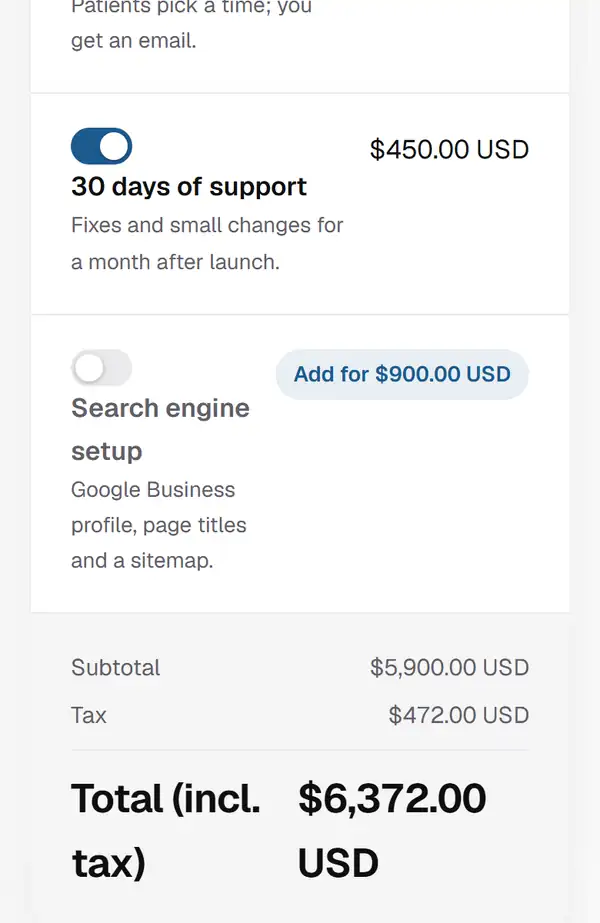
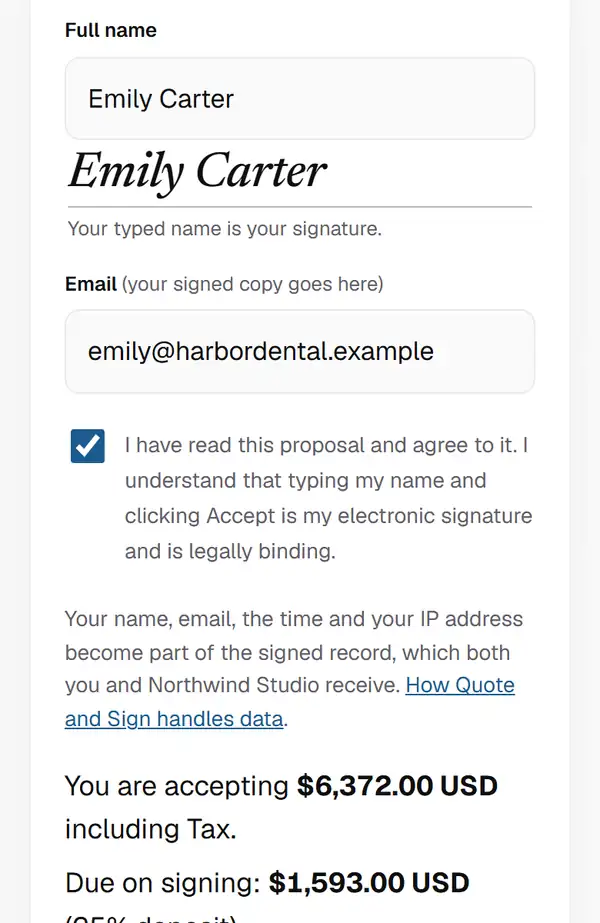
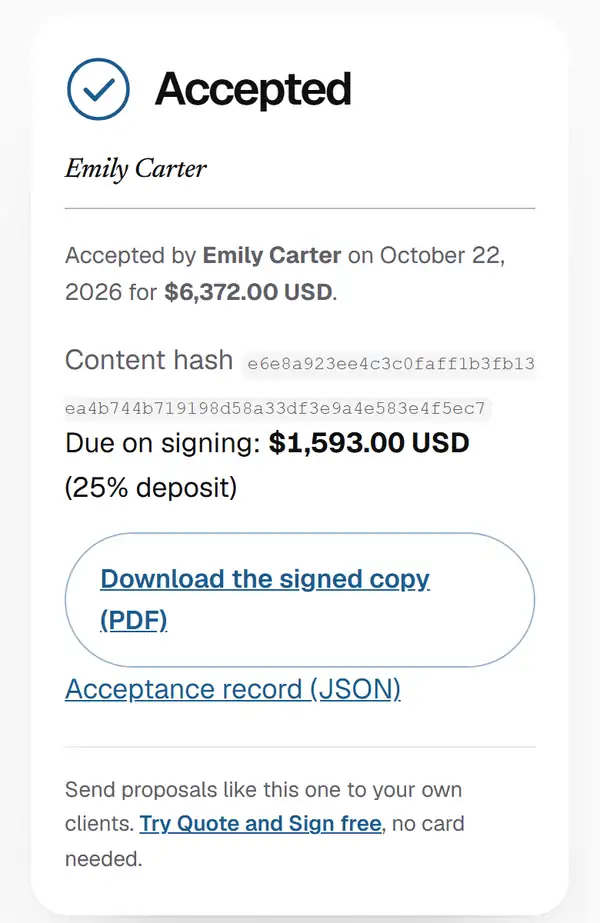
The quote opens as a page on their phone or laptop. No account, no app, no PDF to print and scan.
Why teams and freelancers switch
- One price for the whole teamPro is $19 a month billed yearly for the account. Business adds 10 seats. No fee per person.
- No count on quotesNo per-document fees. Send as many quotes as the work needs.
- A proposal in minutesStart from a template for your kind of work, set your prices, and send the link the same day you talk to the client.
- The client picks the extrasAn extra landing page, a second photographer, a monthly retainer. They switch it on and the total updates.
- Signed on any deviceThey type their name and tap Accept. You both get the signed PDF by email.
- Leave any timeDownload everything you made. Delete your account yourself, no call needed.
The plain truth: if you need a native Salesforce or HubSpot app today, Qwilr has it and we do not.
Side by side
| Feature | Quote and Sign | Qwilr |
|---|---|---|
| Pricing model | Flat per account. Free, Pro $19 a month billed yearly ($24 monthly), Business $59 ($69) with 10 seats | From $35 per user per month on annual billing ($49 monthly). Growth $55 and Scale $75 per user per month, annual only, with five and ten user minimums. |
| Per-document fees | None. Fair use is 200 new proposals a day | $2.50 per document after the plan's monthly allowance (40 on Starter). |
| Client picks extras | Yes. The client switches extras on or off and changes amounts; the total updates as they read | Interactive pricing is available; options are set by the sender |
| Signing record | Name, time, the consent words, what the client picked, and a check that shows the page was not changed after signing. Countersign on Business | E-signature with audit trail |
| Currencies | 16, including CAD, USD, EUR and GBP | Multiple; check the plan |
| Other tools | On Business, each signed quote can go to Zapier, Make or n8n, and from there to HubSpot or Pipedrive | Native integrations on higher tiers |
| Source code | Open source. Anyone can read it or run their own copy | Closed |
| Your data | Download everything as a data file any time, signed copies as PDF; delete your account yourself | PDF export; account deletion through support |
| Sign-in | A code or link by email; no password to remember | Password and SSO |
Qwilr figures from https://qwilr.com/pricing, October 2026. Prices in USD. Qwilr is a trademark of its owner; it is named here only to compare the two products.
What Qwilr does that we do not
- Native connectors for HubSpot, Salesforce and other CRMs, with two-way sync. Quote and Sign can pass each signed quote to Zapier, Make or n8n on Business, but there is no native app.
- A large library of designed page templates and a block library shared across a team. Quote and Sign ships 43 templates across agencies, freelancers, consultants and trades, and lets you save your own.
- Built-in payment collection with QwilrPay. Quote and Sign shows your own payment link after signing rather than processing the payment.
- Larger team features: roles, approval workflows, brand locking across many users.
What we do that Qwilr does not
- Flat pricing. One price for the account, no seats to count, no document limit to watch.
- The client switches extras on or off and sets amounts on the quote. The total updates as they read, and what they picked is part of the signed record.
- The signing record includes a check that shows the page was not changed after signing, so either side can prove what was agreed.
- Open source. Anyone can read how the signing record is built, and you can run the whole thing yourself.
- You can make your first quote without an account. We ask for your email when you send.
How to switch from Qwilr
- Before you cancel Qwilr, download copies of your sent and signed documents so you keep your records.
- Open the template closest to your usual proposal, or start from a blank one. Paste in your own sections: the intro, what is included, the timeline and the terms.
- Add your prices as lines. Put the extras clients often ask for as optional lines they can switch on, and set quantities where the client should choose how many.
- Add your logo and colour on Pro, then send the link. Your client opens it on any device, picks the extras, types their name and accepts. You both get the signed PDF.
Questions people ask
- Is Quote and Sign cheaper than Qwilr?
- Usually, for small teams. Qwilr: From $35 per user per month on annual billing ($49 monthly). Growth $55 and Scale $75 per user per month, annual only, with five and ten user minimums. Quote and Sign is a flat price per account: free for three live proposals, Pro at $19 a month billed yearly ($24 monthly), Business at $59 a month billed yearly, with no per-user or per-document fees.
- What does Qwilr do that Quote and Sign does not?
- Native connectors for HubSpot, Salesforce and other CRMs, with two-way sync. Quote and Sign can pass each signed quote to Zapier, Make or n8n on Business, but there is no native app. A large library of designed page templates and a block library shared across a team. Quote and Sign ships 43 templates across agencies, freelancers, consultants and trades, and lets you save your own. Built-in payment collection with QwilrPay. Quote and Sign shows your own payment link after signing rather than processing the payment.
- What does Quote and Sign do that Qwilr does not?
- The client can switch extras on and off and set amounts on the quote while the total updates, and those choices are part of the signed record. The record includes a check that shows the page was not changed after signing. Quote and Sign is open source, and you can run your own copy.
- Can I move from Qwilr to Quote and Sign?
- Yes. Start from one of the built-in templates, paste your text, and set your own prices. You can make your first quote without an account. Every account starts with fourteen days of Pro, no card needed, and you can download everything you make at any time.
Try it on your next job
Make a real quote in the editor now. Every account starts with fourteen days of Pro, then Free for three live proposals.
Free plan · No credit card · No account until you send